|
|
|


|
Highlights >>>>>>
CCTV Shop
Implementing iCatcher Sample iCatcher Sites Wildlife picture gallery iCatcher Business Partners  |
equipment Video Capture Hardware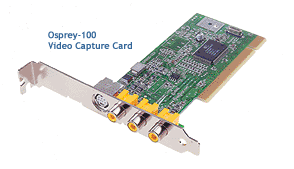 In order to use iCatcher you need to have a video capture device installed
in your machine. For single camera installation this is easy to achieve with
a USB camera or a capture card and a video camera device. When developing
the iCatcher range of applications we looked long and hard for suitable
hardware for multiple installations, we ideally wanted to find a card that
worked well for multiple installations in the same PC. There are many cards
that offer multiple (4) inputs, but we wanted to use simultaneous inputs and
none of these offerings proved suitable. The problem usually lies with the
driver, which although works fine when one card is installed, gets confused
when several cards are installed in the same PC.
In order to use iCatcher you need to have a video capture device installed
in your machine. For single camera installation this is easy to achieve with
a USB camera or a capture card and a video camera device. When developing
the iCatcher range of applications we looked long and hard for suitable
hardware for multiple installations, we ideally wanted to find a card that
worked well for multiple installations in the same PC. There are many cards
that offer multiple (4) inputs, but we wanted to use simultaneous inputs and
none of these offerings proved suitable. The problem usually lies with the
driver, which although works fine when one card is installed, gets confused
when several cards are installed in the same PC.
I am pleased to say that we now have a card we can recommend, the Osprey 100. This card is available from us for UK customers and customers in other parts of the world can purchase cards from their local Osprey/ViewCast suppliers. If you have a problem finding a supplier in your area please get in touch and we will see if we can help. Using the Osprey 100 cards and a PC running iCatcher Console it is possible to build a complete 4 or 5 camera system in one box, with real-time monitoring and advanced alerting. The Osprey 100 Card is also compatible with our i-Catcher Video Server, allowing all four inputs to be used simultaneously. i-Catcher Video Server integrates with iCatcher Console very easily, and is supplied free when you purchase an Osprey 100 from us. For more information on i-Catcher Video Server, click here. Please see the CCTV Shop for a range of capture hardware and software, including the Osprey 100. For further information on the Osprey 100 card, please visit the ViewCast
Website. |
|
© 2007 iCode Systems Ltd. All rights reserved. |