
|
|
|
iCatcher Help
Learn how to set up and use iCatcher's features to their full potential. read more... File download areaDownload all the iCatcher software products, including legacy versions. read more... CCTV ShopWe have an online shop where you can buy video and capture hardware, as well as iCatcher bundles at discounted price. read more... Wildlife picture galleryi-Catcher Wildlife captures fantastic scenes from nature. Take a look at some of the best. read more... Capture equipmentFind out about suitable equipment for use with iCatcher, from cameras to lighting, and more. read more... |
Installation & Troubleshooting The Euresys range of video capture cards provide a low cost high performance video capture system that allows you to easily adapt an existing analogue CCTV system into a digital system, or to build a new system utilising the latest in composite video CCTV cameras. Installation of these cards is usually straightforward, and simply requires the appropriate drivers to be installed prior to the physical installation of the card itself. On occasion a few problems can arise from the driver installation that prevents the card from operating correctly. These situations are covered below. Important: The software installation of the Euresys cards installs both the card driver and accompanying software components. If the automatic installation procedure of Windows is used to install the driver the software component will not be installed and the card will not operate correctly. If you are prompted by the New Hardware Wizard to install drivers, click on "Cancel" and via the driver setup application. Click Here for the latest Euresys MultiCam Drivers The card should be physically installed in the machine after the driver installation has completed. The setup may require the machine to be rebooted, in which case the card should be installed until the reboot has completed and the machine has been shutdown again. Troubleshooting The following is a list of commonly encountered problems with the Euresys cards and their solutions. Card is listed working in Device Manager, but is not visible in iCatcher This happens when only the driver has been installed and not the matching software component. If the driver was installed automatically by Windows, the card will not work correctly until the installation has been run as above. Card works in iCatcher, but is not visible in any other capture application This is normal when the MultiCam driver is installed and the option to install the DirectShow driver has been disabled. iCatcher makes use of the driver direct rather than using a Windows capture driver. Other applications will try to use a Windows capture interface which the Multicam driver itself does not provide, though the installer by default will install a DirectShow component. |
|
|
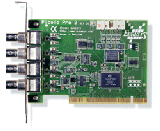 Euresys Capture Cards