
|
|
|
Try iCatcher free
iCatcher software can be tried for 21 days free of charge. Download now and get instant access to iCatcher. read more... Buy iCatcher from $79iCatcher software can be purchased for as little as $79. Get instant access to the full iCatcher software. read more... Sample iCatcher SitesMany thousands of people around the world use iCatcher software. See iCatcher images live. read more... Wildlife picture galleryi-Catcher Wildlife captures fantastic scenes from nature. Have a look at some of the best. read more... Capture equipmentFind out about suitable equipment for use with iCatcher, from cameras to lighting, and more. read more... |
iCatcher Modular Structure Simple & Complex Systems 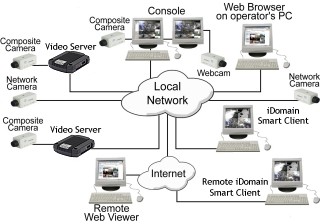
A complete iCatcher system is composed of many components providing the different features of a complex CCTV network. The diagram on the right shows an example system whereby multiple computers have different roles in the CCTV operation, though simpler systems are possible using just a single computer and one piece of application software. iCatcher Console - Central CCTV Component iCatcher Console provides the centre of the CCTV network. The Console computer will handle the CCTV camera feeds, whether local (PCI or USB) or network based, and provide remote access to the system. The Console machine will also handle the processing of alerts and notifications for those feeds which require them.
Network Video Sources Positioned around the CCTV network are various network video sources including network cameras and IP video servers with composite video cameras connected. The use of an already exisitng integrated network simplifies the installation when network cameras are used and reduces the need for co-axial video cameras to be run back to the Console system. Remote Clients iCatcher provides for two kinds of remote clients. The easiest way to view iCatcher remotely is via a simple web browser. iCatcher's web interface is platform independent, and relies only on JavaScript (available in most browsers) for operation. The use of the widely available Java allows iCatcher's web interface to utilise the iPEG encoding and operate with greater video performance, but is not a requirement. iCatcher's Web View is extensive, providing access to live feeds (with multiple feeds visible on screen simultaneously), playback, statistics, I/O device automation and iCatcher administration. Our example shows two web viewers: one on the local network, and one viewing from the internet. The interface is the same for both, regardless of physical location. The remaining system in our example is a simple CCTV Monitor. By running the iCatcher Smart Client a simple low-power dedicated system can be used to display a cycling series of feeds fullscreen on an available monitor, with PTZ control and I/O device control of the CCTV server. For mobile use, we have a series of applications for iOS-based devices that allow mobile viewing, control and playback. |
|